
One system,
every program version traced
DNC Pro sits on top of one or more Bivrost IoT Gateways. The link between part, operation, program version and what is actually on the machine moves out of memory and shared folders into records that can be queried, approved and traced.
Shared folders, USB sticks and memory
fail in six recurring ways
The six scenarios come from chapter 2 of the DNC Pro manual. Each maps to one fixed measure in the system.
Nobody can say which version is on the machine
Versions live in file names. “final”, “final 2” and “final_feed” coexist, and no one can tell which of them the machine is running.
Versions are numbered by the system. Every managed file on every machine records the last successfully transferred version, and the rolling mirror keeps checking the machine against it.
An interrupted transfer leaves a partial program
A dropped line, network jitter, a full controller memory or a locked program number cuts the transfer short. The machine holds an incomplete program and the operator assumes it finished.
Transactional transfer. Success is declared only when the read-back matches what was sent; an uncertain delete result or a later failure triggers a snapshot rollback attempt, with the result recorded in the transfer log.
Edits at the machine go unnoticed
An operator adjusts a cutting parameter on the control. The change exists only in that machine’s memory, the process engineer never hears of it, and the next transfer overwrites it.
When the mirror detects a change it is captured as a pending version and queued in the console. An engineer reviews the diff and adopts or rejects it. The system never overwrites the machine on its own.
A trial program stays on the machine
A trial version is never withdrawn. The next shift treats it as the released program and runs the batch on it.
Trials are explicit and time-boxed, badged on every screen; when they expire a person decides whether to release or withdraw. Trials can be disabled per machine group.
The controller loses its data
A dead battery, lost parameters or a board swap wipes every program on the machine, most of them local programs accumulated over years and never filed anywhere.
The rolling mirror backs up every file on every machine around the clock, not only managed programs. Unmanaged files keep their snapshot history and can be restored.
Traceability questions cannot be answered
A batch is out of tolerance. Which program version, who approved it, when was it sent, to which machine? The existing records cannot say.
An append-only, hash-chained audit log records every state change and every access to program content, searchable by operator, machine, object and time range.
Six core capabilities,
from programming to the machine
The capability structure follows table 1-1 of the manual. All six share one data set and one audit chain, so every action traces back to a named person.
Program vault and versions
Programs are versioned through draft → pending approval → released → retired. Content is deduplicated by hash and any two versions can be compared side by side. Approval policy is set per vault: number of approvers, no self-approval, auto-release.
Transactional transfer
Every transfer is a transaction. An uncertain delete result or a later failure triggers a snapshot rollback attempt. Success is declared only when the read-back equals what was sent. “Send complete” or “read-back complete” alone never counts.
Trials
An explicit, time-boxed operation badged on every screen. On expiry the status becomes “expired” and stays visible; a person decides whether to release or withdraw. The system does not touch the machine.
Rolling mirror
Continuous, incremental backup of every file on every machine, including unmanaged legacy programs. Three kinds of snapshot (pre-transfer, read-back, mirror) are stored deduplicated by content hash. Edits at the machine are captured as pending versions, never auto-reverted.
Roles and permissions
Five fixed roles (administrator, programmer, approver, operator, read-only) × scope (machine group, vault). Local accounts or OIDC single sign-on.
Audit
An append-only, hash-chained log of every state change and every access to program content (viewing or downloading the body). Query, CSV export and chain integrity verification.
- 01 Pre-check
- 02 Snapshot
- 03 Delete
- 04 Send
- 05 Read back
- 06 Verify
- Success (verified)
The gateway talks to the machine.
DNC Pro keeps the programs under control
DNC Pro never connects to a machine directly. All machine communication goes through the Bivrost IoT Gateway: vendor differences are absorbed there, and one system can manage several shops with gateways sized for the equipment. The gateway’s own program-transfer page remains available for debugging and one-off jobs; DNC Pro is its controlled upper layer.
| Responsibility | Bivrost Gateway | DNC Pro |
|---|---|---|
| Machine communication (protocol, encoding, timeouts, reconnect) | ✓ | ✗ |
| Collecting output, OEE, alarms, tool data | ✓ | ✗ |
| Program versions, approval, permissions | ✗ | ✓ |
| Transactional transfer with read-back verification | ✗ | ✓ |
| Fleet-wide rolling backup and snapshot history | ✗ | ✓ |
| Audit and compliance traceability | ✗ | ✓ |
- Programs only
Output, OEE, alarms and tool life belong to the Bivrost Gateway and the systems above it. DNC Pro focuses on the programs themselves.
- People decide
Expired trials are not withdrawn automatically and edited programs are not overwritten automatically. Both wait on screen for a person.
- Data stays on site
All data lives on the customer’s own server, and the system keeps working offline.
- File-level control
Files are transferred and verified as whole units through the gateway, as opposed to RS-232 drip-feed streaming.
Other controls connect through a generic profile. What each device type returns is listed in the gateway's coverage section.
Console and shop-floor terminal:
two clients of one API
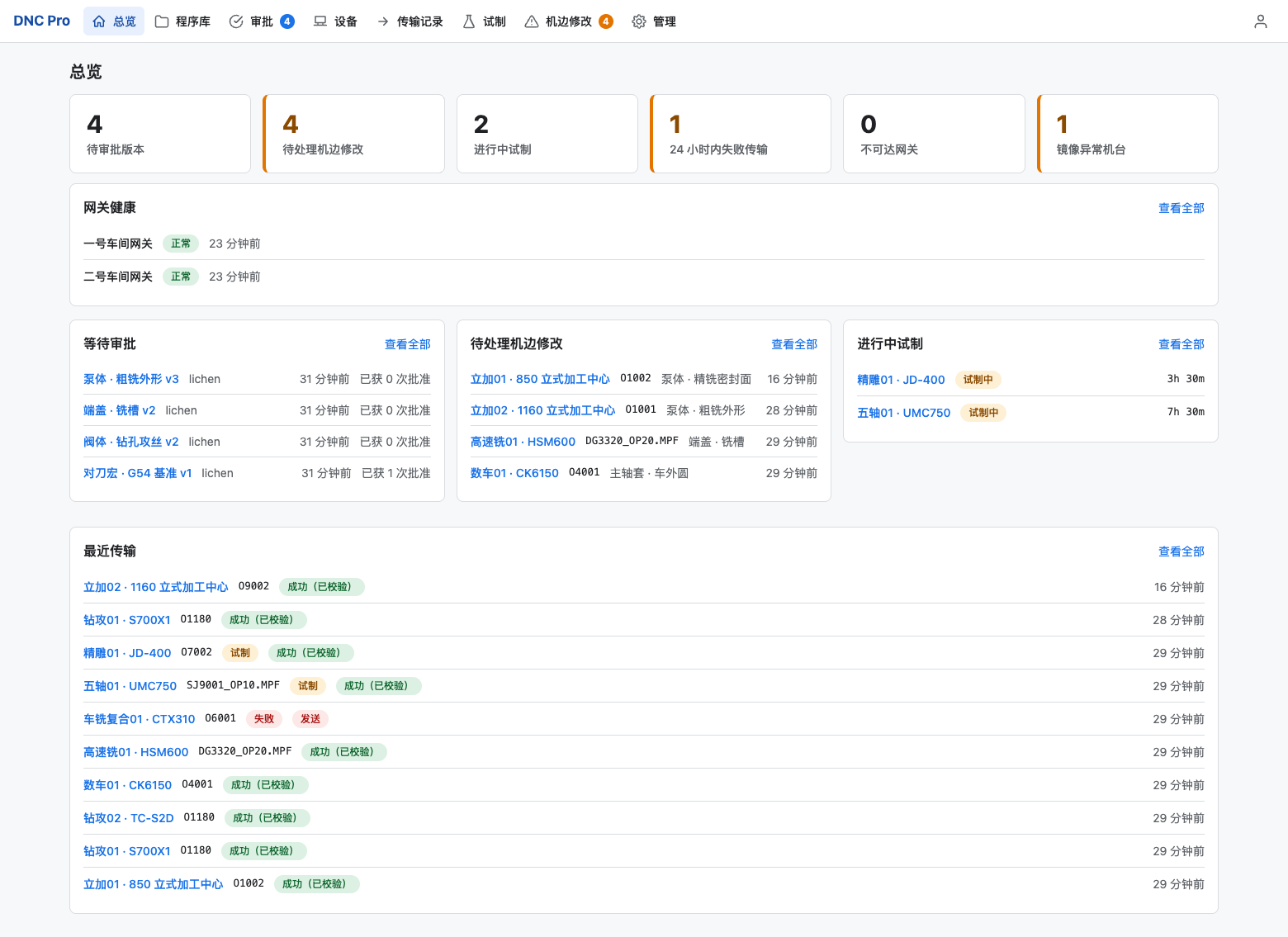
The console serves process, quality and equipment staff. The shop-floor terminal serves operators and shows only the machines they are authorised for and the program each should be running. Screenshots come from the manual’s demo data set; part numbers, program names and people are placeholders.
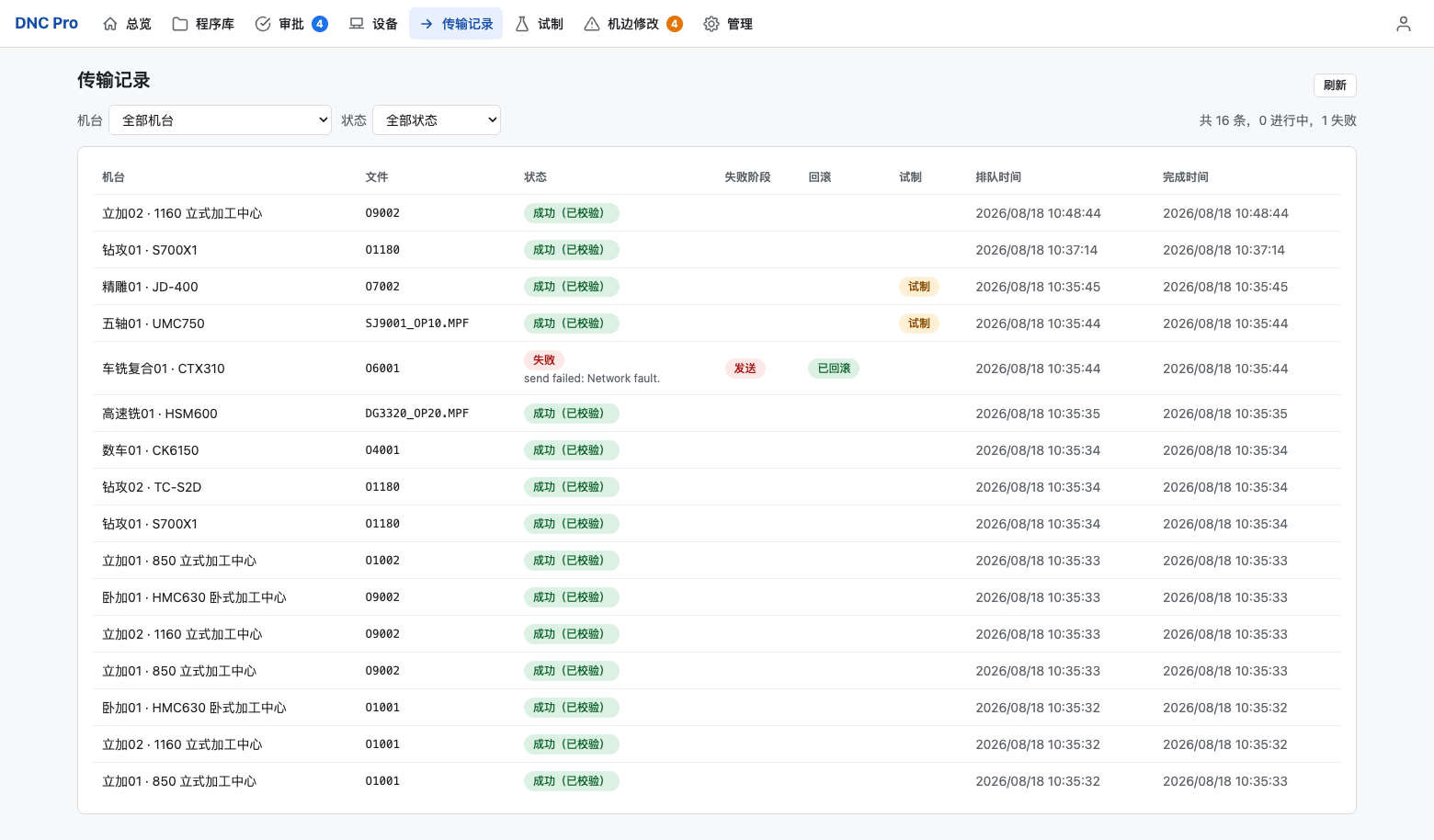
Transfer log
A failed transfer records the failing stage (e.g. send) and the rollback result (e.g. rolled back). The transfer log shows the outcome for review.
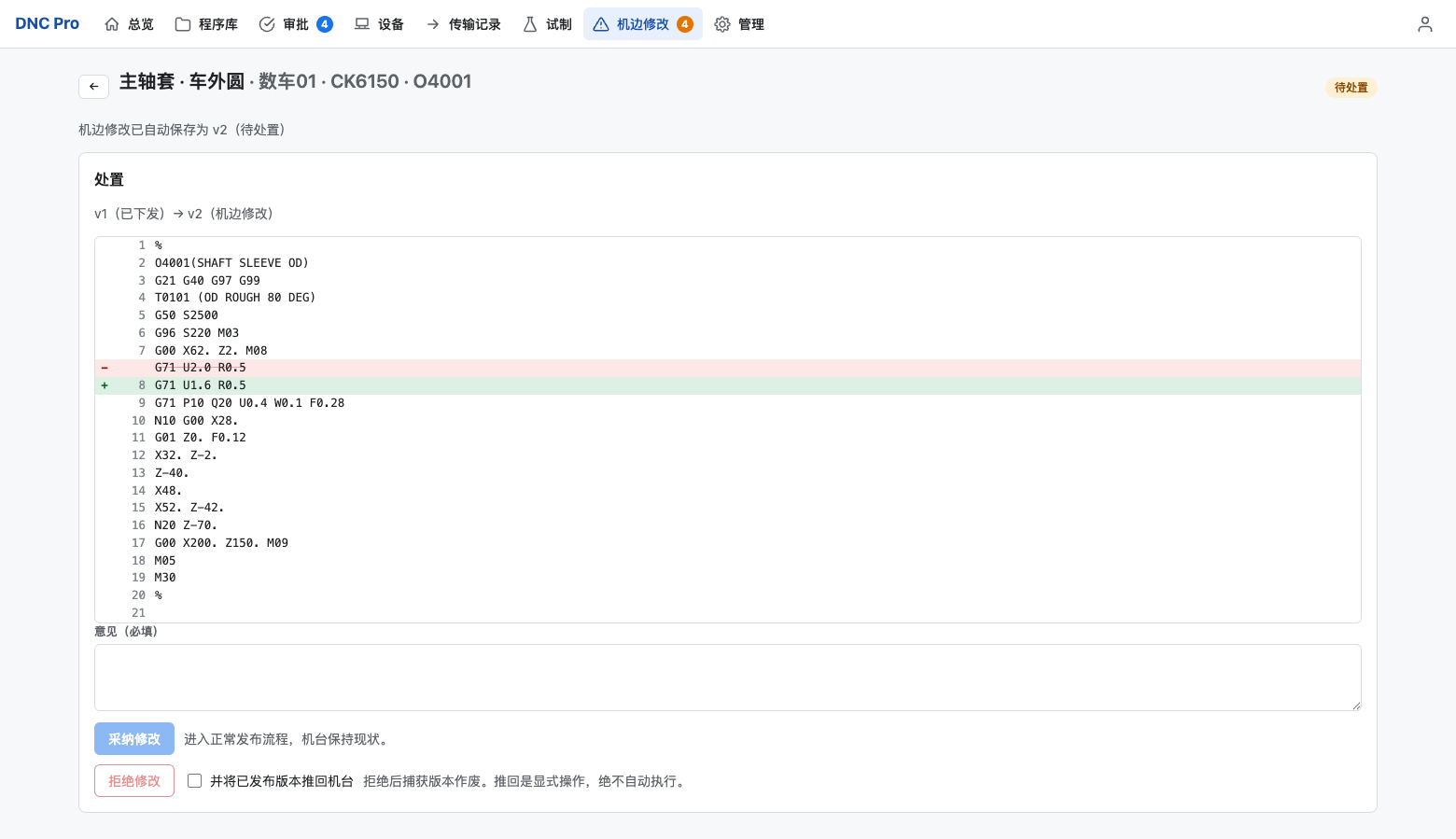
Edits at the machine
When the mirror detects a change to a managed file it is queued; an engineer reviews the diff and adopts or rejects it. Pushing the controlled version back is a separate, explicit action.
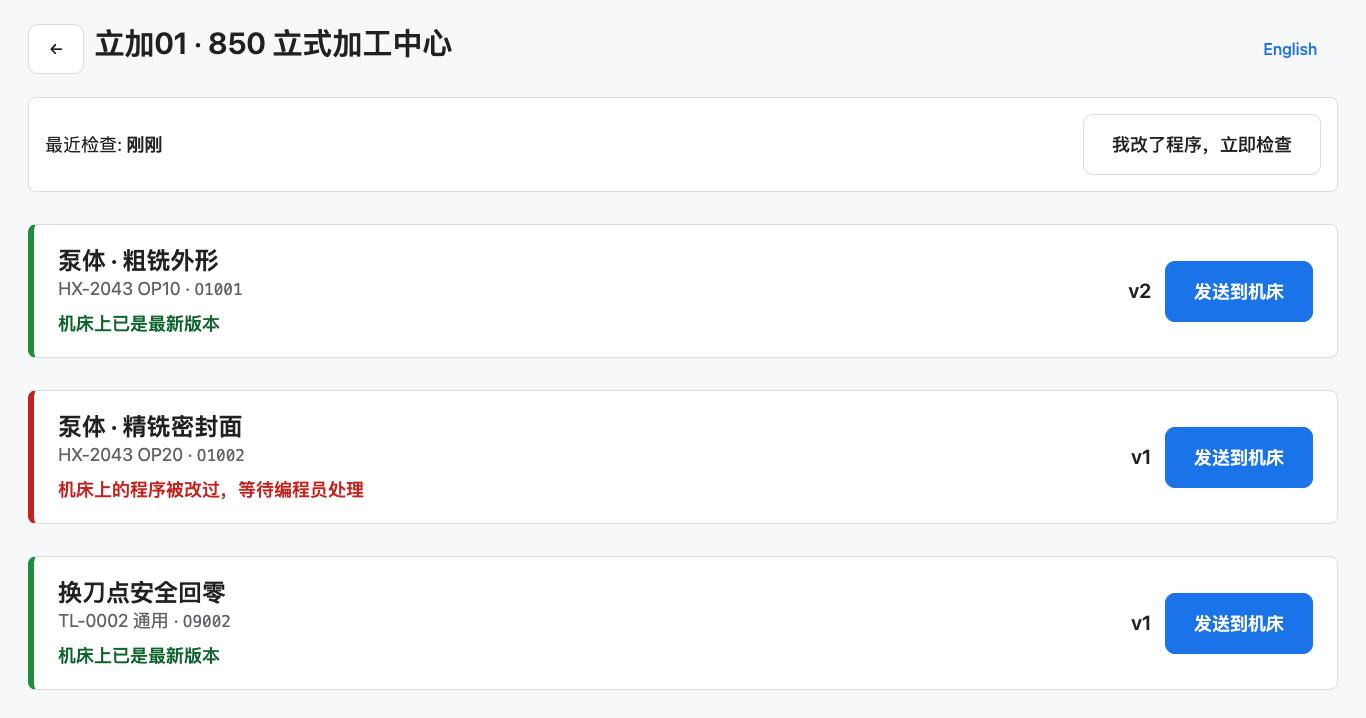
Shop-floor terminal
A touch-screen view limited to the operator’s authorised machines and the program each should be running, with a one-tap “I changed the program, check now”.
Everything the screens can do,
the API can do
The console and the shop-floor terminal are both clients of the same REST API; there are no private endpoints. MES, CAM and dashboard integrations use the same calls and the same permission rules as the screens.
- CAM post-processor uploads a new version 6.3.5.1
- MES transfers in batch per work order 6.3.5.2
- Dashboard reads the overview data 6.3.5.3
- Quality traceability: export the audit trail for a machine 6.3.5.4
Interactive docs ship with the system; endpoints grouped by auth, vault, approvals, fleet, transfer, trials, mirror, audit
Down from the USB-stick round trip of around 30 minutes
The manual is online. No registration
Written as the system’s technical documentation in seven chapters: setup, operation, reference and troubleshooting. The six-stage transfer, the rolling mirror, the role and permission matrix and every REST endpoint are specified item by item. Currently published in Chinese only.